Groups-CAPA Teams
CAPA teams are configured in the Group table in SmartSolve. CAPA teams can be configured by CAPA type and/or site selected when the CAPA record is created.
Group Names
CAPA-Internal-Site is the default group used as a baseline template for configuring your CAPA team members. CAPA stands for the application, Internal stands for the CAPA Type, and Site stands for the Site Code.
In order to use the CAPA system, a group will need to be configured for each CAPA Type.
Example Groups
| CPA Type | Site Code | Site Name | Group Name |
|---|---|---|---|
|
Internal |
MD PH |
Medical Device Pharma |
CAPA-Internal-MD CAPA-Internal-PH |
|
Supplier |
MD PH |
Medical Device Pharma |
CAPA-Supplier-MD CAPA-Supplier-PH |
Group Team Members
CAPA team members are configured under the Role tab of each group. The following default team is listed under the default group and must be configured in order for the CAPA Management application to work properly:
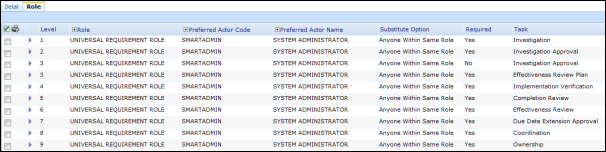
Each team member is identified by task using the default role, UNIVERSAL REQUIREMENT ROLE, and the preferred actor code for task ownership within the CAPA Management workflow. It is important to identify which types of roles to use within your CAPA teams. The default group for the CAPA team lists the following tasks; please see the example user roles that may be configured and tied to these tasks.
| Task | Description | Example User Role |
|---|---|---|
|
Investigation
|
Investigation is a required task in the CAPA Management record and is typically performed by the business unit responsible for the product or process that the CAPA was initiated for. |
CAPA INVESTIGATOR |
|
Investigation Approval
|
Investigation approval is an optional task by default and takes place after the investigation is signed off in the system. Investigation approval can consist of multiple users. |
CAPA APPROVER |
|
Effectiveness Review Plan
|
The effectiveness review plan is a required task in the CAPA Management record and is typically performed by the CAPA coordinator who builds the plan based on the type of CAPA. |
CAPA COORDINATOR |
|
Completion Review
|
Completion review is a required task in the CAPA Management record and is typically performed by the CAPA coordinator who must verify that the CAPA record can be closed. |
CAPA COORDINATOR |
|
Effectiveness Review
|
Effectiveness review is a required task in the CAPA Management record and is typically performed by the CAPA Coordinator who must verify that the CAPA plan provided and implemented is an effective plan. |
CAPA COORDINATOR |
|
Due Date Extension Approval
|
Due date extension approval is a required task only if the due date extension is requested in the CAPA Management record. Due date extensions can be requested for investigations, implementations, and completion of the CAPA. |
CAPA COORDINATOR |
|
Ownership
|
Ownership is a required task in the CAPA Management record. The owner of the CAPA record is not assigned any task other than ownership. The CAPA coordinator is typically the user who completes the work in the CAPA, such as closure.. |
CAPA OWNER |
|
Coordination
|
Coordination is a required task in the CAPA Management record. The CAPA coordinator is typically the user who completes the work in the CAPA, such as Closure. |
CAPA COORDINATOR |
User Rights
The following rights must be assigned to a user for that user to manage or view groups:
| Rights | Description |
|---|---|
|
GRP_MANAGE |
Allows the administrator to add new groups, modify existing groups, or delete groups. |
|
GRP_VIEW |
Allows the user to access and view groups. |
NOTE: See Rights Groups for more information on assigning rights groups to user.
See Also